Straight answers about CueCam, iPhone teleprompter recording, voice tracking, editing, privacy, and subscriptions.
What is a teleprompter app?
A teleprompter app shows your script on screen while you record, helping you read naturally without memorizing every line. CueCam is built for iPhone video, so the teleprompter, camera, captions, editing tools, and export workflow all live in one app.
What does CueCam do?
CueCam is an all-in-one teleprompter and video creation app for iPhone. Write or paste your script, read it while recording yourself on camera, then edit your video without leaving the app. You can trim videos, add subtitles, replace backgrounds, resize for social media, and export to TikTok, Instagram, YouTube, or any platform.
Is CueCam a free teleprompter app?
CueCam is free to download with a limited evaluation. Full access to recording, teleprompter and editing requires a subscription. Check the App Store and the in-app purchase screen for current prices, trial eligibility and billing terms.
What makes CueCam a good teleprompter app for iPhone?
CueCam is designed around the full iPhone recording workflow: script reading, natural eyeline, voice tracking, 4K recording, automatic captions, trim, resize, background tools, audio cleanup, and export. You do not need to record in one app and edit in another.
How does the teleprompter work while recording?
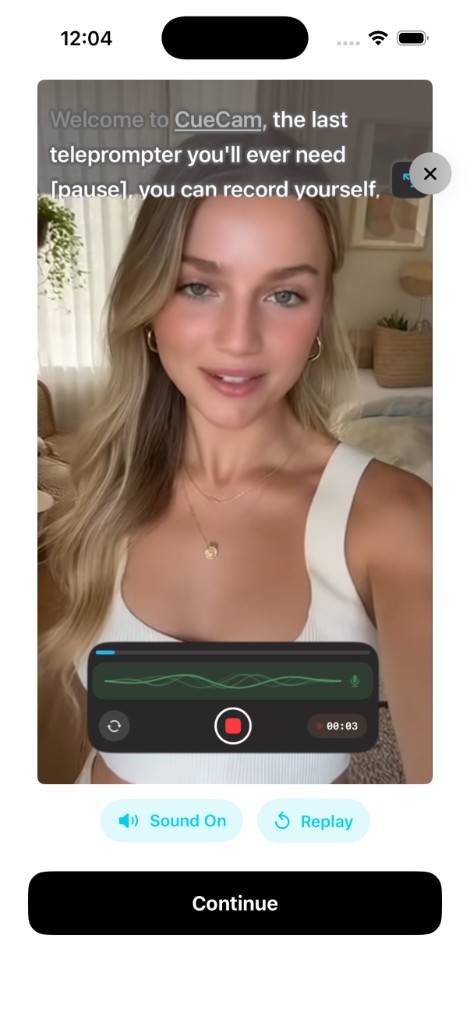
Your script scrolls on screen while the iPhone camera records you. CueCam places the text near the camera area to support natural eye contact, and you can choose Word Tracking, Fixed Speed, or Timed Scrolling depending on the type of video you are making.
Does CueCam have voice tracking?
Yes. Word Tracking uses on-device speech recognition to follow your voice word by word. If you pause, the script waits. If you prefer a simpler flow, Fixed Speed scrolls at a constant pace and Timed Scrolling paces the script to a target duration.
Can I use CueCam as a teleprompter for TikTok, Reels, Shorts, and YouTube?
Yes. CueCam can resize and prepare videos for vertical, square, and widescreen formats, making it useful for TikTok, Instagram Reels, YouTube Shorts, long-form YouTube videos, courses, pitches, tutorials, and social updates.
Is CueCam an online teleprompter?
CueCam is an iPhone app, not a browser-only online teleprompter. Online teleprompters can be useful for practice, but CueCam is built for recording and editing the finished video on your phone, even when you do not want to depend on a desktop setup.
What editing tools are included?
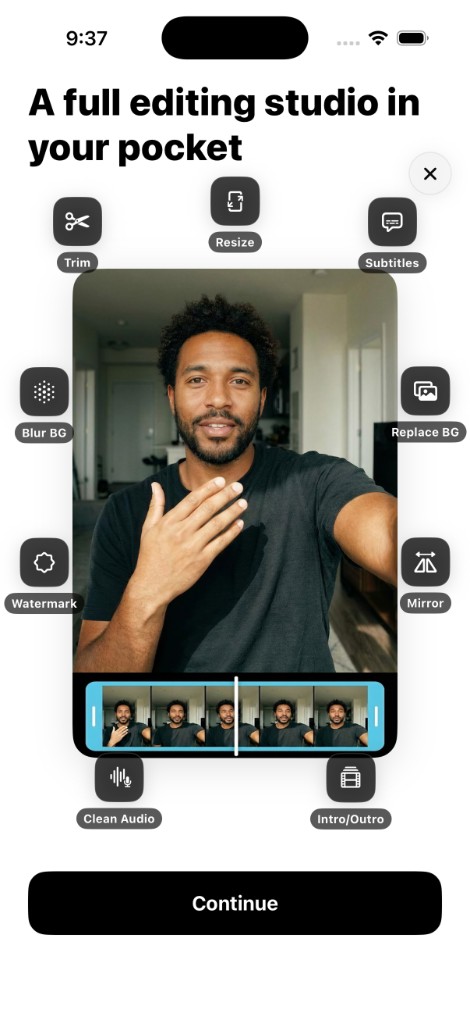
CueCam includes Trim, Auto-Generate Subtitles in 60+ languages, a subtitle editor with multiple styles, Resize for 9:16, 16:9, 1:1, and 4:5, Replace Background, Blur Background, Watermark, Mirror, Clean Audio, and Intro and Outro sequences.
Do I need an internet connection?
Recording and editing run on your device. Speech recognition depends on the system and language. Subscription checks and cloud features, such as Eye Contact beta on Android, require a connection.
Is my content private?
Recording and editing use your device. On Android, the optional Eye Contact beta processes the video in the cloud when you choose to use it. See the privacy policy for usage data and connected services.
How do I cancel my subscription?
Open iPhone Settings, tap your Apple ID, tap Subscriptions, select CueCam, and tap Cancel Subscription. Your access continues until the end of the current billing period.
Is it available for Android?
Yes. Download CueCam for Android on Google Play, or choose the App Store for iPhone and iPad. Features and device requirements can differ between platforms.